
SOP Overview
This document defines the official Sales-to-Delivery Handoff process at Zipcio. It establishes a standardized, accountable workflow from the moment a deal is marked Closed Won in HubSpot to the moment a client kickoff is confirmed and delivery is formally underway.
Purpose
The purpose of this SOP is to:
- Eliminate Errors: Eliminate implementation errors caused by incomplete or verbal-only knowledge transfer
- Avoid gaps: Prevent client expectation gaps between what was sold and what is delivered
- Accountability: Create internal accountability so no handoff step is left without an owner
- Ensure Preparation: Ensure the Solutions Architect (SA) team is fully prepared before any client kickoff
- Standardization: Standardize communication across Sales, Delivery, and Leadership
- Scalability: Create a repeatable, scalable process that survives team growth and personnel changes
Roles and Responsibilities
Ownership is non-negotiable. Every action in this SOP has a named owner.
|
Role |
Team |
Owns |
|---|---|---|
|
Account Executive (AE) |
Sales |
|
|
Solutions Architect (SA) |
Delivery |
|
|
Head of Delivery |
Leadership |
|
|
Automation |
Hubspot |
|
What Sales is NOT Allowed to Promise
- Specific go-live dates without Delivery sign-off
- Custom feature builds or integrations not approved by scoping SA
- Dedicated SA assignments (SA allocation is Head of Delivery's decision)
- Implementation timelines faster than Zipcio's standard delivery windows
- Support SLAs or response times not defined in the contract
Required Systems and Tools
|
Tool |
Role in Handoff Process |
|---|---|
|
HubSpot (CRM) |
|
|
ClickUp (PM) |
|
|
Slack |
|
|
Gamma |
|
|
Supered |
|
Pre-Handoff Requirements
These are the AE's responsibility and must be completed at the time of Closed Won.
AE Must Confirm Before Handoff Initiates
- Contract signed -
- executed copy linked on the HubSpot deal record
- Payment initiated -
- first payment link sent and confirmed received (or payment terms documented)
- Scope documented - in quote and contract:
- Hubs purchased
- Tiers
- Add-ons recorded
- Primary stakeholders identified - at minimum:
- Main point of contact
- Billing contact
- Technical contact
- Promised timeline recorded - communicated to the client in quote & email
- Go-live date
- Milestone dates
- First value moment defined -
- What does the client expect to see first
- By when
- Key client outcomes documented -
- 2-3 things the client said they most want to achieve
- Custom promises logged -
- Any verbal commitment must be documented in the quote
- Integration flags noted -
- Any third-party tools the client needs connected are listed
- Risk flags noted -
- Anything that makes this engagement non-standard or higher risk is documented in the deal
Step-by-Step Handoff Workflow
There are four phases in the handoff. Each phase has a defined owner, trigger, and completion criteria. No phase begins until the previous one is complete.
Phase 1 - Deal Closed (AE Ownership)
Trigger: AE moves deal to Closed Won in HubSpot
|
STEP 1 AE MARKS DEAL CLOSED WON
|
|
STEP 2 AE COMPLETES THE HANDOFF CHECKLIST
|
|
STEP 3 AE INTRODUCES DELIVERY TEAM
|
Escalation: AE Does Not Complete Checklist in 24 Hours
-
HubSpot workflow fires: Slack alert sent to Head of Delivery
-
Head of Delivery pings AE directly and logs a note on the deal
-
If not resolved within 4 business hours of escalation, Sales Manager is looped in
-
No SA work begins until checklist is complete - timeline does not start until this gate clears
Phase 2 - Internal Handoff (SA Ownership)
Trigger: AE marks Handoff Checklist complete in HubSpot
|
STEP 4 SA REVIEWS THE HANDOFF CHECKLIST
|
|
STEP 5.a SA SETS UP PROJECT INFRASTRUCTURE
|
|
STEP 5.b HUBSPOT AUTOMATION FOR KICKOFF EMAIL
|
Phase 3 - Client Onboarding Preparation (SA Ownership)
Trigger: Client books kickoff
|
STEP 6 SA BUILDS THE KICKOFF DECK
|
Phase 4 - Kickoff (SA Ownership)
Trigger: Definition of Ready criteria met (Section 6)
|
STEP 7 SA SCHEDULES AND RUNS KICKOFF CALL
|
|
STEP 8 SA HANDOFF COMPLETE
|
Internal Communication Standards
Slack Channels
|
Channel |
Purpose |
|---|---|
|
#new-deal-assignment |
|
|
#[clientname]-zipcio |
|
SLA Standards
|
Action |
SLA |
|---|---|
|
AE completes Handoff Checklist |
At the time of Closed Won |
|
AE sends Handoff Email |
Within 24 hours of Closed Won (ideally 12) |
|
SA responds to client handoff email |
Within 24 hours of Handoff Email sent |
|
SA preps for kickoff & alerts of red flags |
Within 48 hours of client assignment, at least 24 hours before kickoff |
|
Kickoff held |
Within 10 business days of Closed Won (standard) |
Client Communication Standards
All client-facing communication during the handoff window is SA-owned unless otherwise specified.
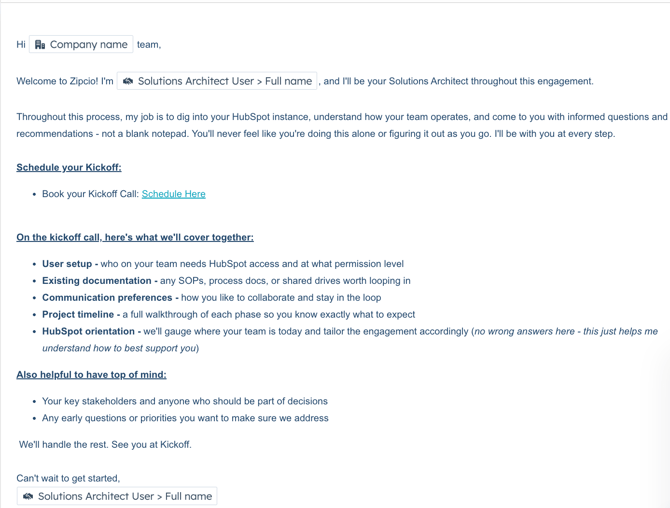
Client Handoff Email Template
Automation Trigger: Deal = Closed Won ; Solutions Architect User = Known
QA Checklist
This checklist is completed by the SA before the kickoff is confirmed.
Pre-Kickoff QA - SA Completes
|
Checklist Item |
Owner |
|---|---|
|
Signed contract linked on HubSpot deal record |
AE |
|
Proposal or SOW linked on HubSpot deal record |
AE |
|
All Handoff Checklist fields complete in HubSpot |
AE |
|
Payment initiated or payment terms documented |
AE |
|
ClickUp space created from standard template |
Automation |
|
Client Slack channel created with correct naming convention |
Automation |
|
Kickoff deck created |
SA |
|
Timeline validated by SA |
SA |
|
All open questions resolved - no pending blockers |
SA |
Risk Mitigation and Escalation Process
Red Flag Account Criteria
An account should be flagged as a red flag if ANY of the following are true at the time of handoff:
- Timeline is aggressive or out of the ordinary to close the deal
- Scope is ambiguous or the client's expectations appear broader than what was sold
- Multiple stakeholders with conflicting priorities
- Custom promises were made outside the signed SOW
- Client has had a bad experience with a previous HubSpot implementation
- Deal closed significantly below standard pricing
- AE flagged difficulty managing expectations during the sales cycle
Red Flag Account Process
-
SA flags the account as Red Flag in HubSpot by changing the project status to “At Risk”
-
SA notifies Pod Leader in Slack with a summary of the concern
-
Pod Leader reviews before kickoff is scheduled
-
Pod Leader and SA align on a risk mitigation plan
-
Kickoff prep is adjusted accordingly (additional discovery, scope call, etc.)
-
AE is looped into the call if expectations need to be reset
Handoff Completion Criteria
The handoff is officially complete when ALL of the following are true. This is not a soft milestone - it is a hard gate.
- Kickoff call has been held
- Scope has been verbally confirmed with the client on the kickoff call
- Timeline has been agreed upon by both the client and the SA
- First value milestone has been communicated and acknowledged by the client
- Communication cadence (check-ins, updates) has been agreed upon
- Kickoff recap has been sent to the client
Common Failure Points
These are the most frequent places this process breaks. Knowing them is the first step to preventing them.
|
Failure Point |
What Happens |
|---|---|
|
AE verbal-only handoff |
|
|
Checklist completion treated as optional |
|
|
SA doesn't review the contract |
|
|
Timeline promised before SA validation |
|
|
Kickoff scheduled too early |
|
|
No escalation path used |
|
|
Custom promises not documented |
|
Metrics and KPIs to Track
These metrics are tracked in HubSpot and reviewed by Head of Delivery on a weekly basis.
|
Metric |
Definition |
Target |
|---|---|---|
|
Time to Kickoff |
Business days from Closed Won to confirmed kickoff |
Target: 10 business days or fewer |
|
Escalation Rate |
% of handoffs that require a scope or timeline escalation |
Monitor for trends |
|
Red Flag Account Rate |
% of Closed Won deals flagged as red flag |
Monitor for trends |
|
Client Satisfaction at Kickoff |
Short survey sent post-kickoff (optional but recommended) |
Target: 4.5+/5 |
Best Practices
For Sales
- Complete the checklist the same day the deal closes - do not wait for the 1-day SLA. Momentum matters.
- Brief the SA verbally if the deal is complex. The checklist captures facts but not nuance.
- Never tell the client a timeline before looping in Delivery. Say: 'We'll confirm your go-live timeline with our implementation team and get back to you within 24 hours.'
- Document every custom promise in the notes field of the HubSpot deal at the time it is made - not after the fact.
For Delivery
- Read the quote and contract, not just the checklist. The contract is the legal record of what was sold.
- Flag scope ambiguity early and loudly. The longer you wait, the harder the conversation becomes.
- Use the kickoff call to confirm scope, not just introduce yourself. Verbal confirmation protects you later.
For Leadership
- Build a quarterly retrospective into this SOP review. Ask: what broke, what was slow, what do we wish we had known at handoff.